
Place Doc2Home orders right from your EHR.
EnrollPRO is free for Doc2Home practices. It reads the open chart, suggests the products your practice offers and fills in the enrollment, in about 15 to 30 seconds per patient. There is a route for every EHR, and set-up takes about a minute.
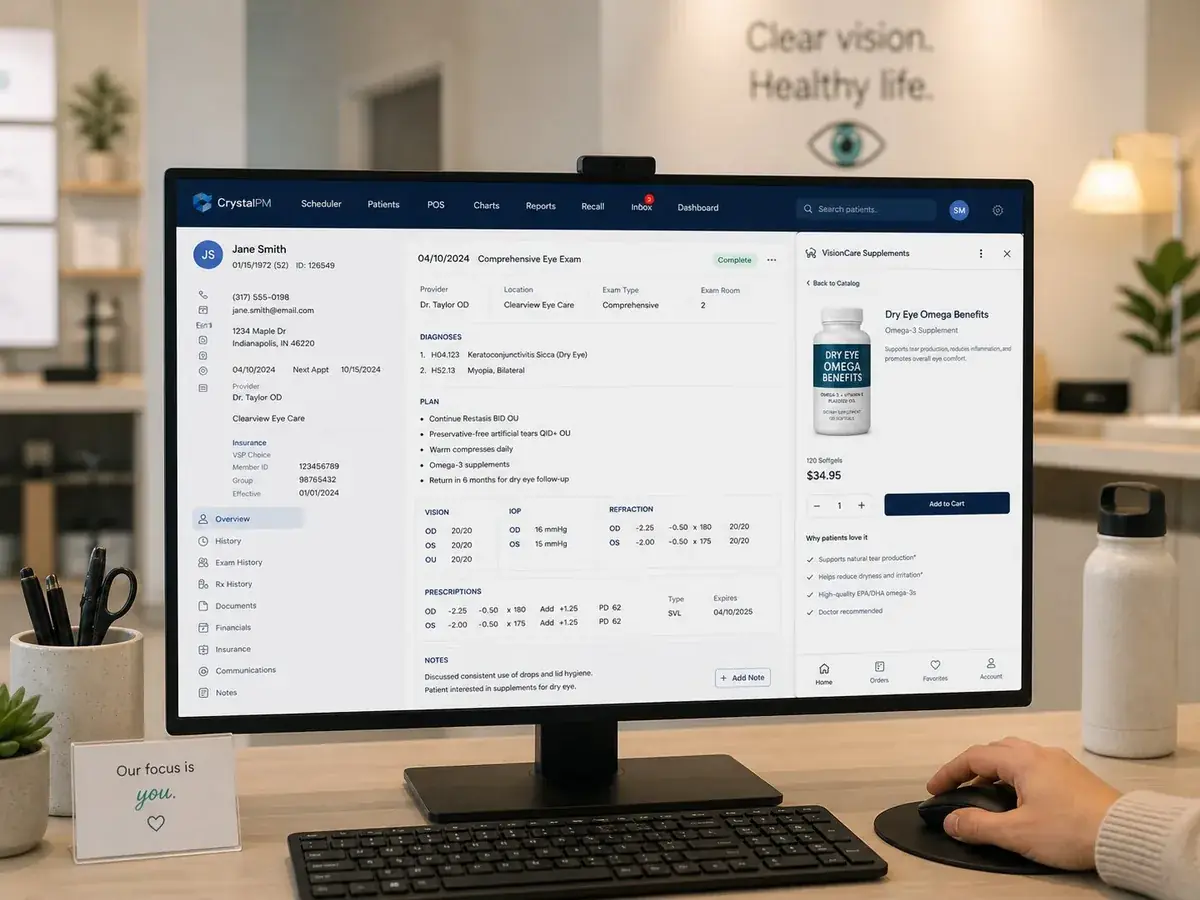 Free for Doc2Home practices
Is your EHR browser-based or Windows-based?
Pick the option that fits and we will walk you through it. Every practice has a route, including when the EHR cannot be read or staff prefer typing.
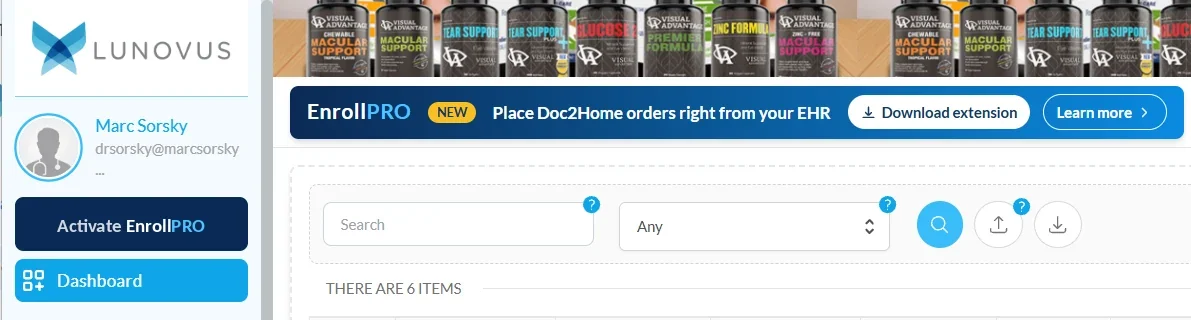
EHR opened in Chrome at a web address
- Add the free EnrollPRO extension to Chrome.
- Sign in and activate it once.
- It reads the open chart for staff.
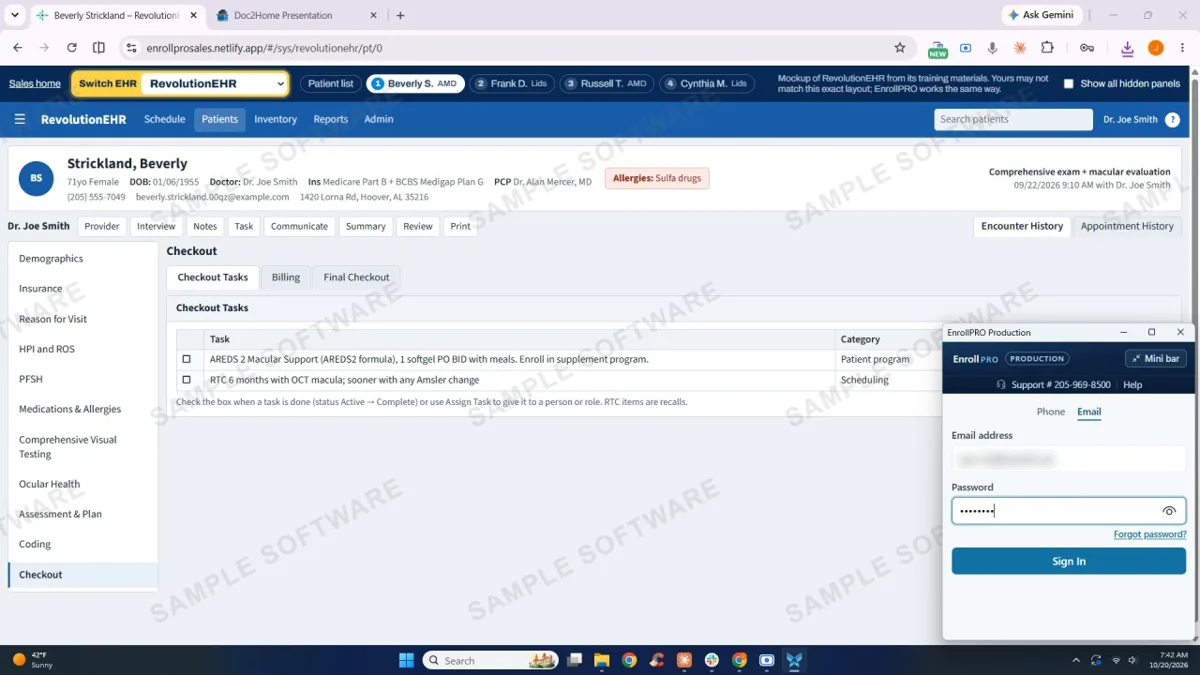
EHR that is a program on a Windows computer
- Download and install EnrollPRO for Windows.
- Sign in once.
- It reads the open chart on screen, like the browser version.
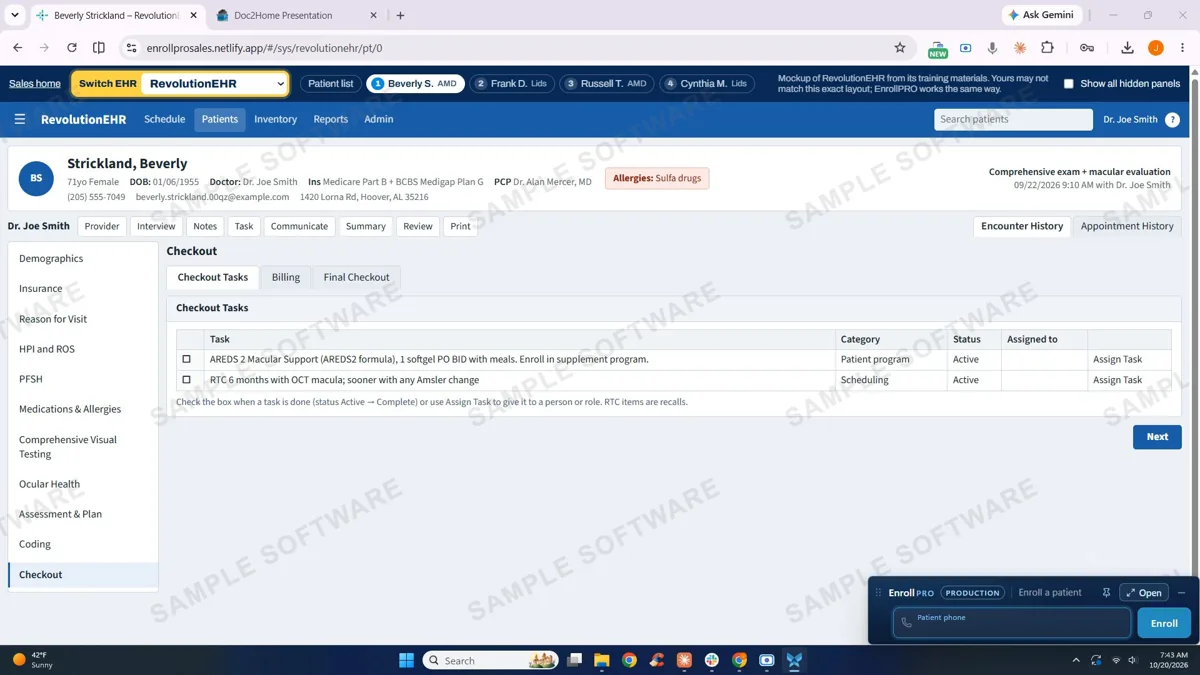
EHR that cannot be read, or a team that prefers typing
EnrollPRO Mini is the same enrollment with the details typed in: about 30 seconds per patient, and it works with any EHR or none.
Not sure which one you are? In Chrome, a web address (https://…) means your EHR is browser-based. A program with its own window and no address bar means it is Windows-based. Still unsure? Call 1-800-980-6551.
EHRs that cannot be read. Some Windows EHRs block screen reading. In that case, use EnrollPRO Mini.
It does the busywork.
No more checking the chart, finding the link and typing it all in. EnrollPRO places Doc2Home orders right from your EHR, and it is free for Doc2Home practices. Set-up takes about a minute, then it is about 15 to 30 seconds per patient.
Reads the patient’s chart
When the doctor recommends a supplement, EnrollPRO reads the chart and checks it against the supplements or lid scrubs you offer.
Fills the enrollment fields
It fills the enrollment fields on Doc2Home automatically. Staff just confirm.
The patient pays
Tap to pay, send a payment link or enter the card.
Patient privacy is built in.
What it reads, what leaves your practice and how it is handled.
Supports your practice’s HIPAA obligations. All patient data shown in the presentations is simulated.
Browser: log in, install, activate.
For an EHR you open in Chrome at a web address. Set-up takes less than a minute; steps 2 and 3 both happen on your Doc2Home home screen, with the same login. About 15 seconds per patient after that.
- 1Log inLog in to the Doc2Home platform. Doctor login (opens in a new tab). Forgot your login? Call us at 1-800-980-6551.
- 2InstallSelect Download extension on the home screen, then Add to Chrome and Add extension on the Chrome Web Store page.
- 3ActivateSelect Activate EnrollPRO in the left nav bar of the Doc2Home home screen.
Then repeat on every computer that sees patients: front desk, checkout, optical, the doctor’s. EnrollPRO only reads your EHR, not your email or other websites. Not right for this patient? Click Not a fit and keep going.
Windows: set up once, then it reads the chart.
Enroll from the chart already open in your Windows EHR. A one-time setup of about a minute per computer, then about 30 seconds per patient. No clinical information leaves your practice.
Part 1 · One-time setup (about a minute, once per computer)
- Download EnrollPRO for Windows.
- Save the installer.
- Open the download.
- If Windows asks (“Windows protected your PC”), click More info, then Run anyway. Windows shows this for any new app.
- Click Next, then Install, then Finish.
- The EnrollPRO bar appears at the bottom of the screen. Click Sign in.
- Sign in with your Doc2Home login. EnrollPRO stays signed in on that computer.
Part 2 · Every patient (EnrollPRO reads the chart; your staff confirms)
- Open the patient’s chart when the doctor recommends a supplement or lid care, as usual in your EHR.
- EnrollPRO reads it, on that computer.
- A product from the ones your practice selected is suggested. Staff click Order or Not a fit.
- Name, phone, email and shipping address are filled in from the chart. Staff review them.
- Staff pick an option (1 month, 3 months, or a free first month) and confirm with the patient.
- Enrolled. The order goes to Doc2Home.
- Read on this computer
- Nothing clinical leaves your practice
- No outside AI
Not a Windows EHR? Choose again.
Mini: the same enrollment, with the details typed in.
For an EHR that cannot be read, or a team that prefers typing. Doc2Home enrollment right beside your EHR, or with no EHR at all: set up once, then about 30 seconds per patient.
Part 1 · One-time setup
- Download
- Save the installer
- Open the download
- Run anyway
- Install
- The Mini bar appears
- Sign in
Part 2 · Every patient
- Open the chart
- Phone, then Enroll
- Name, email, doctor
- Sample, product, plan
- Address
- Review and pay
Need your EHR login link to finish an install, or a hand with setup? Email support@lunovus.com or call 1-800-980-6551. Not a Doc2Home practice yet? EnrollPRO is activated with your Doc2Home account: start below.
EnrollPRO questions
Why is EnrollPRO so quick?
Because it does the busywork. EnrollPRO reads the chart, checks it against the supplements or lid scrubs your practice offers, and fills in the enrollment fields on Doc2Home. Staff confirm the details and the patient pays: tap to pay, a payment link, or the card. It is about 15 seconds per patient with the Chrome extension and about 30 seconds with the Windows version or EnrollPRO Mini.
Why don’t staff handle the card?
Three reasons: HIPAA and PCI compliance is automatic (no card data touches your practice systems), patients are more willing to pay on their own device, and staff never get stuck troubleshooting a payment. Enrollment completion rises from about 30% (paper or staff-handled) to 71% or more.
What is the actual conversion rate?
Across the EnrollPRO patient base, 71% of patients who receive the secure link complete payment within 24 hours. Of those, 85% or more are still on auto-ship at six months. Compared with a pay-at-checkout workflow, EnrollPRO roughly doubles enrollment completion.
Does EnrollPRO need other software or hardware?
No. The browser-based EnrollPRO works on any front-desk device with internet (desktop, laptop or tablet) and installs in a few minutes; on supported browser-based EHRs it can read the open chart and pre-fill patient details. There is a Windows version for EHRs that are programs on a Windows computer, and EnrollPRO Mini (details typed in) for any EHR that cannot be read. Nothing else is required.
How are staff rewarded?
Staff earn Amazon credit for every enrollment they complete, paid by Lunovus, not by the practice. The credit arrives monthly in the staff member’s own account. Practices report that it noticeably increases staff engagement with the supplement conversation.
Does EnrollPRO change my commission?
Not one cent. Lunovus covers every staff reward from its own budget. Your commission structure stays exactly as it is.
What if a patient declines or never pays the link?
No commission, no harm. The secure link expires after 7 days. If the patient does not pay, nothing happens: no charge, no follow-up pressure. About 23% of links expire unpaid; that is expected and built into the conversion numbers.
Can EnrollPRO work with our existing supplement inventory?
Yes. EnrollPRO can enroll into Doc2Home auto-ship (Lunovus formulas), into PrivateFill auto-ship (the brands you already recommend), or mark an in-office sale for Bulk Order practices. The enrollment tool is the same; the fulfillment path varies.
Is the patient information secure?
Yes. Patient name, address and email are stored encrypted. Payment runs through a PCI Level 1 processor; card numbers never touch Lunovus or your practice systems. A BAA is available on request.
Activate a program this week.
Doc2Home, EnrollPRO, PrivateFill and Bulk Order are live now. Tell us about your practice and we will reach out personally to walk through which programs fit and get you set up. Supplement programs activate the same day.
- One 20-minute setup callA short walkthrough shows what to have ready.Watch: what to have ready
- No contract, no credit cardCancel any program at any time.
- We reply within 1 business dayNeed us sooner? Call 1-800-980-6551.
No contract · No credit card · We respond within 1 business day